It is very easy to migrate your Wordpress site or Wordpress Blog and move all your previous wordpress content over to your barnd you web hosting account with us.
In just 4 easy steps and very quick and without problems this is how you do it.
1. Backup WordPress Files and Database
Using the import/export option
We will move wordpress using the wordpress import/export option. We need to export all data/content from the old host.
Here is how you do it. Go to your old wordpress admin area. Go to tools ->export and download the XML (WXR) file to your computer.

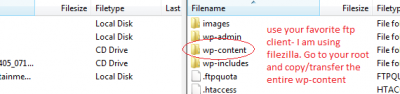
Now open up your favorite ftp client. Copy and make backup of the entire wp-content folder.
Make sure you know the location of the drive where you save the folder so you could easily access it later.
2.Install wordpress to your giganetwebhosting.com account using softaculous.
Video: Wordpress web hosting. Installing wordpress with 1 click! Giganetwebhosting.com
13. Import your old wordpress site to the new wordpress installation.

In the new blog, go to Tools → Import → WordPress and upload the file you downloaded in step 1.
Make sure that you choose the option to Download & import file attachments. This option will be available after you upload the file.
Video attachments could not be moved.
Now we need to verify that the blog on the new host is functioning properly.
Use the IP URL we have send you to check your site.
14. Replace the OLD nameservers with the NEW one
Go to your domain registrar and to the domain you wish to change the dns record.
Replace the old name servers with the new we have send you for your site.
You are done!
Your wordpress site will be visible on your new web hosting account with us, as soon as the domain is propagated in about 24 hours.